# Uncomment to install if needed:# install.packages(c("lavaan", "semTools", "MASS", "ggplot2",# "dplyr", "tidyr", "corrplot", "knitr", "lmtest",# "mclust", "dbscan"))library(lavaan) # CFA and SEM (Cases 1 and 3)library(semTools) # htmt() and auxiliary SEM tools (Cases 1 and 3)library(MASS) # mvrnorm(): generate multivariate normal data (all cases)library(ggplot2) # Visualizations (all cases)library(dplyr) # Data manipulation (all cases)library(tidyr) # Data reshaping (Cases 2 and 3)library(corrplot) # Correlation heatmap (Case 1)library(knitr) # Nicely formatted tables (all cases)library(lmtest) # Breusch-Pagan heteroskedasticity test (Case 2)library(mclust) # Gaussian mixture models / latent class analysis (Case 4)library(dbscan) # Local outlier factor and DBSCAN clustering (Case 5)
Part 5: Outlier Detection and Robust Estimation
Connecting to the Earlier Cases
Part 4 showed what happens when your sample contains two fundamentally different types of respondents — latent subgroups with distinct data-generating processes. Part 5 is a continuation of exactly that problem, extended to observational data and reframed as the problem of outliers.
The methods covered here — LOF, DBSCAN, robust regression — are, in structural terms, derived from or closely related to the latent subgroup logic in Part 4. LOF and DBSCAN identify clusters and density anomalies that often correspond to distinct latent populations mixed into your sample. Robust regression downweights points that do not fit the dominant cluster’s data-generating process. These are statistical implementations of the same conceptual question Part 4 posed directly: are all observations in this dataset from the same population?
The section on inliers at the end of this part makes the connection explicit in the opposite direction. Inliers are a latent subgroup that happens to be statistically invisible — they cannot be detected by any of the methods covered here. Handling them correctly requires the conceptual reasoning of Part 4, not just the statistical tools of Part 5.
Not all outliers are the same. Two important distinctions that are easy to conflate:
Statistical outliers vs. conceptual outliers
A statistical outlier is any observation that is unusual relative to the rest of the sample — it has a high LOF score, a large residual, or sits far from the regression line. The statistical definition is purely data-driven and says nothing about whether the observation represents a problem.
A conceptual outlier is an observation that comes from a fundamentally different data-generating process than the rest of your sample. Luxury flagship stores in a dataset of convenience stores are conceptual outliers: they do not just deviate from the regression line, they operate on entirely different economics. The same statistical method (advertising spend → sales) applies, but the parameters are different.
Why the distinction matters: Statistical outliers that are not conceptual outliers (a data entry error, an extreme but real observation) should be checked, corrected if erroneous, and handled with robust methods. Conceptual outliers that are also statistical outliers are a sampling problem, not a statistical noise problem — they reveal that your sample is actually a mixture of populations. The right response is Part 4 logic (latent subgroup analysis), not just downweighting the extreme values.
Within the statistical outlier category, two types behave differently:
Collective outliers are a group of observations that form their own cluster, far from the rest of the data. They usually represent a different population — like luxury flagship stores in a dataset of regular convenience stores. These are a version of the latent-subgroup problem from Part 4: if you include them, your regression line tries to average over two different data-generating processes. These are the conceptual outliers described above.
Point outliers (or global outliers) are individual observations that are simply extreme on one or more variables. They may represent data errors, rare events, or genuinely unusual cases. They pull the regression line toward them and inflate standard errors. These are more likely to be pure statistical outliers — unusual, but not necessarily from a different population.
Both types distort your results — but in different ways, and the solutions are different.
WarningAvoid arbitrary outlier rules — they replace thinking with a ritual
A widespread practice in applied research is to apply mechanical thresholds before analysis: remove any observation more than 2 standard deviations from the mean, or more than 3 interquartile ranges from the median, or with a z-score above 3.29. These rules appear rigorous because they are quantitative. They are not.
The problem is conceptual, not statistical. The question “should this observation be in my analysis?” is a question about the data-generating process — about whether this observation is from the target population and whether it represents a valid instance of the phenomenon being studied. No arbitrary cutoff can answer that question. An observation 4 SD from the mean may be the most interesting data point in your sample. An observation well within range may be from a completely different population.
Mechanical thresholds also introduce researcher degrees of freedom in a hidden form. Because the threshold is chosen before looking at the data, it can feel objective — but the choice of 2 SD vs. 3 SD vs. 3 IQR makes a substantial difference, and different choices can change your conclusions. Applying a rule “everybody uses” does not eliminate the subjectivity; it just obscures it.
The right approach is to treat every flagged observation as a question about the data-generating process: Why is this observation extreme? Does it come from the same population as the rest of my data? Is it a measurement error or a genuine extreme case? LOF, DBSCAN, and robust regression — covered in the steps below — are tools to find candidate observations for this investigation, not to replace it.
NoteThe connection to latent subgroup analysis (Part 4)
Collective outliers are, structurally, the same problem as latent subgroups. A cluster of luxury flagship stores isn’t “wrong data” — it’s a different population with a different data-generating process. Including them in your pooled model is like combining Green Champions and Price Skeptics from Part 4: the resulting coefficient doesn’t accurately describe either group. The statistical tools in Part 5 (LOF, DBSCAN, robust regression) detect these clusters empirically. Part 4’s finite mixture models detect them probabilistically. Both are answering the same question.
Point outliers, by contrast, are statistical problems rather than conceptual ones. A single data entry error or an unusually extreme store doesn’t imply a hidden population — it’s just a disruptive data point that needs to be handled carefully.
The hardest case — inliers — is a latent subgroup that neither approach can detect statistically. That requires domain knowledge about whether observations belong in your target population in the first place.
Simulating the Dataset
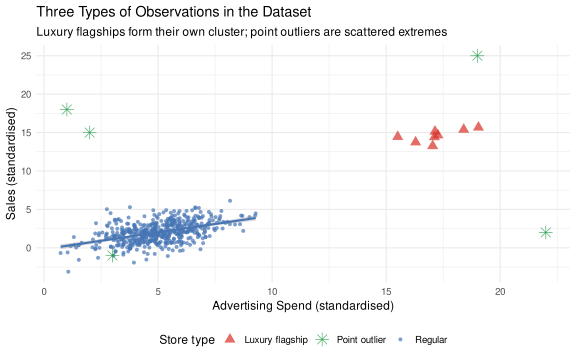
We create a store-level dataset with three groups:
Regular stores (n=500): Standard advertising–sales relationship (true slope = 0.40)
Luxury flagships (n=20): Collective outliers — much higher advertising and a steeper advertising–sales relationship, forming their own cluster
Point outliers (n=8): Individual stores with implausibly extreme or internally inconsistent values
▶ Simulate store dataset with collective and point outliers
set.seed(2025)# ── Regular stores ─────────────────────────────────────────────────────────────# True DGP: sales = 0.40 * advertising + noise (slope = 0.40, no intercept)n_reg <-500adv_reg <-rnorm(n_reg, mean =5, sd =1.5)sales_reg <-0.4* adv_reg +rnorm(n_reg, sd =1.2)# ── Luxury flagship stores (collective outliers) ───────────────────────────────# Different economic model: much higher advertising, steeper returns to advertising.# Their cluster (centroid ≈ 20, 20) is far from the regular cluster (≈ 5, 2) —# the "between-cluster" slope is ~1.2, which will pull OLS well above 0.40.n_lux <-20adv_lux <-rnorm(n_lux, mean =20, sd =1.5)sales_lux <-0.90* adv_lux +rnorm(n_lux, sd =0.8) +2# steeper slope, similar absolute level# ── Point outliers (individual extreme observations) ───────────────────────────n_pt <-8# Point outliers are placed either at very low adv with implausibly high sales,# or at high adv with implausibly low/negative sales, or in the mid-range gap# (adv 10–13, between the regular cloud and the luxury cluster) with extreme sales.# This keeps them visually isolated — none overlap the regular-store region.adv_pt <-c(24, 0.5, 11, 22, 1, 23, 12, 21)sales_pt <-c(-1, 22, -8, 35, 20, 2, 26, -3)# ── Combine into single dataset ────────────────────────────────────────────────df5 <-data.frame(advertising =c(adv_reg, adv_lux, adv_pt),sales =c(sales_reg, sales_lux, sales_pt),store_type =c(rep("Regular", n_reg),rep("Luxury flagship", n_lux),rep("Point outlier", n_pt)))
Step 1: Visualising the Three Types of Stores
▶ Plot: stores colored by true type
ggplot(df5, aes(x = advertising, y = sales, colour = store_type, shape = store_type)) +geom_point(aes(size = store_type), alpha =0.7) +geom_smooth(data =filter(df5, store_type =="Regular"),method ="lm", se =TRUE, colour ="#4575b4",linewidth =1.0, inherit.aes =FALSE,aes(x = advertising, y = sales)) +scale_colour_manual(values =c("Regular"="#4575b4","Luxury flagship"="#d73027","Point outlier"="#1a9641"),name ="Store type" ) +scale_shape_manual(values =c("Regular"=16, "Luxury flagship"=17, "Point outlier"=8),name ="Store type" ) +scale_size_manual(values =c("Regular"=1.5, "Luxury flagship"=3.5, "Point outlier"=4),name ="Store type" ) +labs(x ="Advertising Spend",y ="Sales",title ="Three Types of Observations in the Dataset",subtitle ="Luxury flagships form their own cluster; point outliers are scattered extremes" ) +theme_minimal(base_size =12) +theme(legend.position ="bottom")
WarningWhat to notice
Regular stores (blue): tight cluster with a clear advertising→sales relationship. This is the population you actually want to model.
Luxury flagships (red triangles): a separate cluster in the upper right. They form a coherent group — this is the collective outlier problem. Including them will rotate your regression line toward theirs.
Point outliers (green stars): scattered in unusual positions — very high advertising with low sales, or very low advertising with high sales. These are individually anomalous.
Step 2: Detecting Outliers with Local Outlier Factor (LOF)
Local Outlier Factor (LOF) is a density-based method: it compares how densely packed each observation’s neighbourhood is relative to its neighbours’ neighbourhoods. If a point is in a sparse region surrounded by denser regions, it gets a high LOF score.
LOF ≈ 1: Normal point (density similar to neighbours)
LOF > 2–3: Moderate outlier (noticeably sparser than surroundings)
LOF >> 3: Strong outlier
▶ Compute LOF scores and visualize
# Standardise the variables before computing LOFdf5_scaled <-data.frame(advertising =scale(df5$advertising),sales =scale(df5$sales))# Compute LOF scores (minPts = number of neighbours to consider)df5$lof_score <- dbscan::lof(df5_scaled, minPts =10)# Visualise LOF scoresggplot(df5, aes(x = advertising, y = sales,colour = lof_score, size = lof_score)) +geom_point(alpha =0.8) +scale_colour_gradient2(low ="#4575b4", mid ="#ffffbf", high ="#d73027",midpoint =2, name ="LOF score") +scale_size_continuous(range =c(1, 5), name ="LOF score") +labs(x ="Advertising Spend",y ="Sales",title ="Local Outlier Factor (LOF) Scores",subtitle ="Warmer colour and larger point = more outlier-like" ) +theme_minimal(base_size =12) +theme(legend.position ="right")
▶ Table: top outliers by LOF score
# Show the top outliers by LOF scoredf5 |>arrange(desc(lof_score)) |>select(advertising, sales, store_type, lof_score) |>head(15) |>mutate(across(where(is.numeric), \(x) round(x, 2))) |>kable(col.names =c("Advertising", "Sales", "Store Type", "LOF Score"),caption ="Top 15 Observations by LOF Score (highest = most outlier-like)" )
Top 15 Observations by LOF Score (highest = most outlier-like)
Advertising
Sales
Store Type
LOF Score
0.50
22.00
Point outlier
13.41
1.00
20.00
Point outlier
12.34
11.00
-8.00
Point outlier
11.56
24.00
-1.00
Point outlier
9.30
21.00
-3.00
Point outlier
8.80
22.00
35.00
Point outlier
7.60
23.00
2.00
Point outlier
6.67
12.00
26.00
Point outlier
5.26
1.06
-3.10
Regular
2.42
8.16
6.12
Regular
2.09
2.76
5.03
Regular
1.83
16.53
16.10
Luxury flagship
1.76
3.77
5.29
Regular
1.75
3.94
-1.92
Regular
1.74
8.73
2.20
Regular
1.69
NoteReading the LOF scores — and what to do with them
What LOF is telling you: Each store’s LOF score compares how densely packed its neighborhood is relative to its neighbors’ neighborhoods. A score near 1.0 means the store is in a region as dense as its surroundings — it looks like a typical store. A score of 2 or 3 means the store is in a region roughly 2–3 times sparser than its neighbors’ neighborhoods — it is noticeably isolated. Very high scores (5+) indicate severe outliers.
The critical point about classification: LOF scores do NOT give you clean “outlier” vs “not outlier” categories. There is no universal threshold that separates outliers from normal observations — you have to choose one, and that choice involves judgment. Common practice is to flag observations with LOF > 2 or LOF > 3 for investigation, but these cutoffs are conventions, not laws of nature.
Practical steps for each high-LOF observation: 1. Look at the observation. What are its actual values? Does anything look unusual? 2. Is it a data quality issue (entry error, unit mismatch)? Fix or remove. 3. Is it a legitimately extreme but real observation (a genuinely exceptional store)? Keep and investigate — it may be telling you something important about your data. 4. Does it form part of a coherent group of unusual observations? If yes, that’s a collective outlier — treat it as a Part 4 problem (latent subgroup), not a Part 5 problem.
Never delete observations just because they have high LOF scores. LOF is a signal to investigate, not an automatic deletion criterion.
Step 3: DBSCAN Clustering to Find the Collective Outlier Cluster
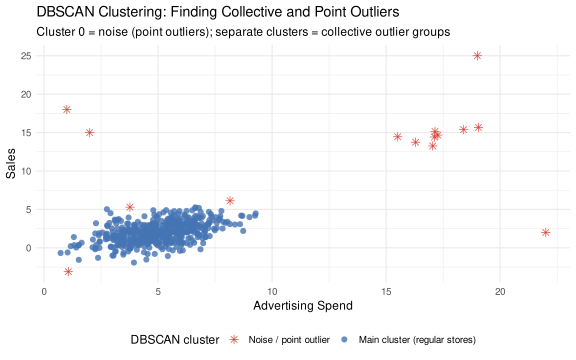
DBSCAN (Density-Based Spatial Clustering of Applications with Noise) finds clusters of any shape in your data, and labels anything too sparse to belong to a cluster as noise (cluster 0). This is useful for finding collective outliers: they form their own cluster (separate from the main group), while true point outliers get labelled as noise.
# Fit DBSCAN# eps: maximum distance to be considered a "neighbour"# minPts: minimum cluster sizedbscan_fit <- dbscan::dbscan(df5_scaled, eps =0.4, minPts =4)df5$cluster <-factor(dbscan_fit$cluster)ggplot(df5, aes(x = advertising, y = sales,colour = cluster, shape = cluster)) +geom_point(size =2.5, alpha =0.8) +scale_colour_manual(values =c("0"="#1a9641", # noise = green (point outliers — matches scatter plot)"1"="#4575b4", # main cluster = blue (regular stores)"2"="#d73027", # luxury cluster = red (luxury flagships — matches scatter plot)"3"="#fdae61"), # any additional clusterlabels =c("0"="Noise / point outlier","1"="Main cluster (regular stores)","2"="Collective outlier cluster (luxury)","3"="Additional cluster"),name ="DBSCAN cluster",drop =FALSE ) +scale_shape_manual(values =c("0"=8, "1"=16, "2"=17, "3"=15),labels =c("0"="Noise / point outlier","1"="Main cluster (regular stores)","2"="Collective outlier cluster (luxury)","3"="Additional cluster"),name ="DBSCAN cluster",drop =FALSE ) +labs(x ="Advertising Spend",y ="Sales",title ="DBSCAN Clustering: Finding Collective and Point Outliers",subtitle ="Cluster 0 = noise (point outliers); separate clusters = collective outlier groups" ) +theme_minimal(base_size =12) +theme(legend.position ="bottom")
NoteHow to read the DBSCAN output — and the limits of inferred classification
What the clusters mean: - Cluster 0 (noise/green): Points too isolated to belong to any cluster. These are candidates for point outliers — individually anomalous observations. Check each one. - Cluster 1 (main mass): The main group of regular stores. This is your target population for most analyses. - Cluster 2+ (secondary clusters): Coherent groups separated from the main mass — collective outliers. These are a latent subgroup problem (Part 4), not a statistical noise problem.
Important: these are inferred, probabilistic classifications. DBSCAN does not know “the truth” about which stores are outliers any more than you do. It finds density-based patterns in the data, but: - The clusters depend on your choice of eps and minPts — different settings will produce different cluster assignments - A store assigned to cluster 0 (noise) may simply be on the outskirts of a real cluster that DBSCAN missed with your parameter settings - A store assigned to the main cluster may still be unusual in ways DBSCAN cannot see with just two variables
The classifications are a starting point, not a verdict. Use them to flag observations for further investigation. Do not treat cluster assignment as definitive.
Choosing eps and minPts: There is no single correct answer. A practical approach: plot the k-nearest-neighbor distances (sorted) and look for an “elbow” — the point where the distance curve bends sharply. That elbow value is a good starting point for eps. For minPts, a common default is 2 × (number of dimensions in your data).
NoteLOF vs DBSCAN: what each tool actually tells you
Both methods are density-based, but they answer different questions.
LOF
DBSCAN
Output
A continuous score per observation
A discrete cluster label per observation
Question answered
How outlying is each point?
What structure do the outliers have?
Point outliers
High LOF score
Label = 0 (noise)
Collective outliers
Elevated LOF (but often less extreme than point outliers, because members of the cluster look normal relative to each other)
Assigned their own separate cluster (label ≠ 0, ≠ main cluster)
Key strength
Ranks observations on a continuous scale; good for sensitivity analysis
Identifies whether outliers form a coherent group — the critical distinction between point outliers and collective outliers
Key limitation
Does not tell you whether outliers are isolated or clustered together
Binary: in or out. Sensitive to eps and minPts choices
Practical implication for this case: LOF flags both luxury flagships and point outliers with high scores, but does not tell you why they are outlying or whether they belong together. DBSCAN reveals that the luxury flagships form their own coherent cluster — which means they represent a latent subgroup (Part 4 problem), not random noise. That distinction changes the recommended response: a separate subgroup analysis, not just robust estimation.
Use LOF to rank observations by how unusual they are. Use DBSCAN to understand whether unusual observations are isolated data points or an alternative population. Both are diagnostic tools, not verdicts.
Step 4: Robust Regression — No Need to Delete Outliers
The traditional advice — delete the outliers and refit — creates its own problems: it introduces researcher degrees of freedom (which ones do you delete?), it loses information, and it’s post-hoc. A better approach is robust regression, which automatically downweights observations that don’t fit the main data pattern.
We use MASS::rlm() with MM-estimation (method = "MM"). MM-estimators combine two stages: first, a highly robust initial fit that is resistant to both high-residual and high-leverage outliers; then, an M-estimation refinement step that achieves high statistical efficiency on clean data. The result is a slope estimate that is simultaneously resistant to the kinds of contamination we have in this dataset — a separate cluster at high leverage and scattered point outliers — while remaining close to OLS when the data are clean.
▶ OLS vs. robust MM-regression coefficient comparison
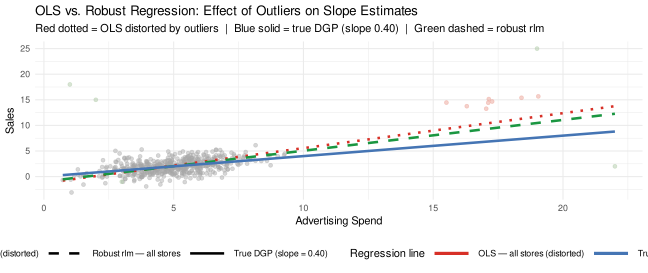
# ── Fit regression models ─────────────────────────────────────────────────────m_ols_all <-lm(sales ~ advertising, data = df5)m_robust <- MASS::rlm(sales ~ advertising, data = df5, method ="MM")# True DGP: sales = 0.4 * advertising (known from simulation — slope = 0.40)# ── Compare coefficients against true DGP ────────────────────────────────────coef_compare5 <-data.frame(Model =c("OLS — all stores (distorted by outliers)","True DGP (known from simulation)","Robust MM-estimation — all stores"),`Advertising coefficient`=round(c(coef(m_ols_all)["advertising"],0.40,coef(m_robust)["advertising"]), 3))kable(coef_compare5,col.names =c("Model", "Advertising Coefficient"),caption ="OLS vs. Robust MM-Regression: The luxury flagship cluster and point outliers pull OLS well above the true DGP slope; MM-estimation recovers close to 0.40.")
OLS vs. Robust MM-Regression: The luxury flagship cluster and point outliers pull OLS well above the true DGP slope; MM-estimation recovers close to 0.40.
Model
Advertising Coefficient
OLS — all stores (distorted by outliers)
0.878
True DGP (known from simulation)
0.400
Robust MM-estimation — all stores
0.446
▶ Plot: OLS vs. robust MM regression lines
# Generate prediction linesx_seq <-seq(min(df5$advertising), max(df5$advertising), length.out =300)newdat <-data.frame(advertising = x_seq)pred_lines <-data.frame(advertising =rep(x_seq, 3),sales =c(predict(m_ols_all, newdata = newdat),0.40* x_seq, # True DGP: slope = 0.40, intercept = 0predict(m_robust, newdata = newdat)),model =rep(c("OLS — all stores (distorted)","True DGP (slope = 0.40)","Robust MM — all stores"),each =length(x_seq)))ggplot() +geom_point(data = df5,aes(x = advertising, y = sales, colour = store_type),alpha =0.45, size =1.5) +geom_line(data = pred_lines,aes(x = advertising, y = sales, colour = model),linewidth =1.2) +scale_colour_manual(values =c("Regular"="#4575b4","Luxury flagship"="#d73027","Point outlier"="#1a9641","OLS — all stores (distorted)"="#d73027","True DGP (slope = 0.40)"="#4575b4","Robust MM — all stores"="#1a9641" ),breaks =c("OLS — all stores (distorted)","True DGP (slope = 0.40)","Robust MM — all stores"),name ="Regression line" ) +guides(colour =guide_legend(order =1, override.aes =list(linewidth =1.5))) +labs(x ="Advertising Spend",y ="Sales",title ="OLS vs. Robust MM-Regression: Effect of Outliers on Slope Estimates",subtitle ="Red = OLS distorted by outliers | Blue = true DGP (slope 0.40) | Green = robust MM" ) +theme_minimal(base_size =11) +theme(legend.position ="right",legend.direction ="vertical",legend.key.width =unit(1.5, "cm"))
ImportantThe core lesson from robust regression
OLS (all stores): Pulled sharply toward the luxury cluster and point outliers. The luxury flagship stores are at high advertising values (x ≈ 20), giving them enormous leverage — even though they are only 4% of the sample, they contribute more than half the total variation in advertising spend. Combined with the point outliers, OLS produces a slope well above the true value of 0.40. Predictions for a regular store using this coefficient will be systematically biased.
True DGP (slope = 0.40): The known data-generating process for regular stores — included in the plot because we simulated the data and know the ground truth. In real research you would not see this line; you would only see how OLS and robust estimates diverge.
Robust MM-estimation (all stores): Addresses both high-residual outliers and high-leverage points. The initial S-estimation step finds a robust fit resistant to the luxury cluster’s leverage; the M-estimation refinement achieves efficiency on the regular-store observations. The result is a slope close to the true 0.40 — without deciding in advance which observations to delete.
Practical advice: 1. Always plot your data and check for visual outliers before running any regression 2. Use LOF and/or DBSCAN to systematically detect outliers you might miss visually 3. For collective outliers (like luxury stores), investigate whether they represent a distinct subgroup — if so, treat them as a Part 4 problem 4. For point outliers, verify the data and report results with and without them as a robustness check 5. Use rlm(method = "MM") rather than the default Huber M-estimator when your data contains high-leverage clusters — the default Huber weighting can still be dominated by high-leverage points
Checking How Much Your Results Depend on Outliers
A simple sensitivity check: compare OLS and robust regression. If they give substantially different results, outliers are influencing your conclusions. If they agree, outliers aren’t driving your findings.
▶ Sensitivity table: OLS vs. robust MM coefficients
Sensitivity Check: OLS vs. Robust MM-Estimation Coefficients
Method
Intercept
Advertising Slope
OLS (all stores)
-2.169
0.878
Robust MM-estimation (all stores)
-0.228
0.446
NoteReporting guidance
When you run a robust regression as a sensitivity check and it tells a different story from OLS:
Report both estimates in your paper
Investigate which observations are driving the OLS estimates (use LOF scores, DBSCAN clusters, or Cook’s distance)
Describe these observations substantively: are they a separate population? A data quality issue?
Be transparent about the sensitivity of your conclusions to these observations
When OLS and robust regression agree: briefly note the robustness check as evidence that your results are not driven by a small number of influential observations.
The Inlier Problem: Statistical Normalcy ≠ Conceptual Homogeneity
Every outlier method we have used so far answers one question: is this observation unusual relative to what I can see in the data? LOF asks whether a point’s neighbourhood is unusually sparse. DBSCAN asks whether it belongs to any dense cluster. Robust regression downweights points whose residuals are large. None of these methods can answer a fundamentally different question: does this observation come from the same data-generating process as the phenomenon I am trying to study?
Those are different questions, and conflating them produces a critical blind spot — the inlier.
An inlier is an observation that is statistically unremarkable on the dimensions you are measuring — low LOF score, inside the main cluster, small residuals — but belongs to a different population with a different data-generating process. It passes every diagnostic you run. That is precisely what makes it dangerous.
NoteInliers are a latent subgroup problem (Part 4), not a statistical outlier problem
Recall that in Part 4, latent subgroup analysis worked because the subgroups had statistically detectable differences — Green Champions and Price Skeptics responded differently on the measured items, and finite mixture models could identify them from the data alone.
The inlier problem is a harder version of the same structure. Inliers belong to a different latent subgroup — a different population with a different data-generating process — but they are statistically indistinguishable from the target population on the variables you have measured. No mixture model, no LOF score, no density cluster will separate them. The subgroup is latent in the deepest sense: invisible to all available statistical tools.
This is why the inlier problem is ultimately a measurement and sampling problem, not a statistical one. The relevant question — “are these observations from the same population as the phenomenon I am studying?” — is answered by domain knowledge about what you are measuring and who belongs in your target sample, not by any diagnostic statistic.
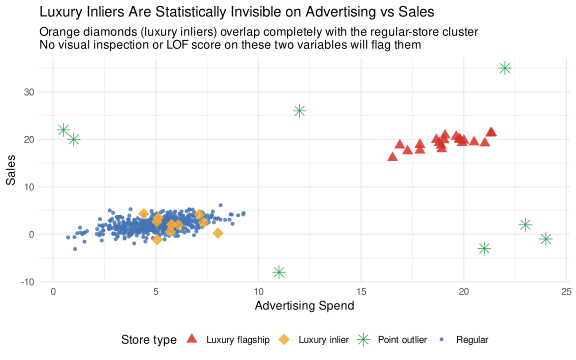
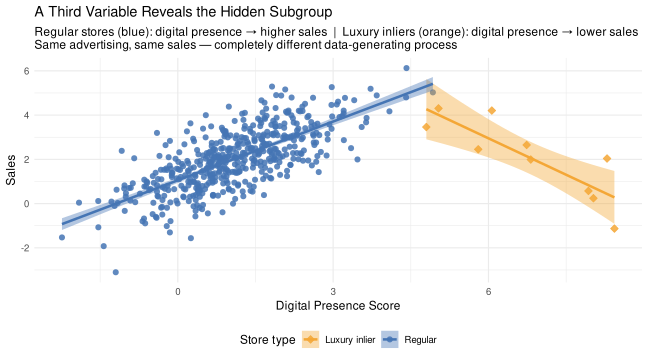
The scenario. Some luxury flagship stores happen to advertise in similar amounts and generate similar aggregate sales as regular convenience stores — perhaps because they serve a very small, very wealthy clientele from a single compact location. On advertising vs. sales, they are invisible. But these same stores have a completely inverted relationship with digital marketing. For regular stores, digital presence drives foot traffic and conversions — more digital → more sales. For luxury inliers, digital overexposure signals accessibility and undermines exclusivity — more digital → fewer sales. A researcher who detects and removes the obvious luxury outliers but keeps the inliers will draw incorrect conclusions about what drives sales. The inliers contaminate the analysis just as much — but no diagnostic flagged them.
Simulating the Luxury Inliers
We extend the dataset with 10 luxury inlier stores and add a third variable — digital presence score — that has opposite sign relationships with sales across the two populations.
▶ Add luxury inliers + digital presence variable (extends df5)
set.seed(42)n_lux_in <-10# Luxury inliers: advertising and sales deliberately overlap with regular stores.# On the main two dimensions, they are statistically indistinguishable.adv_in <-rnorm(n_lux_in, mean =5.2, sd =1.4)sales_in <-0.38* adv_in +rnorm(n_lux_in, sd =1.15)# Third variable: digital presence score (0–10 composite: social media, web traffic,# online reviews). Key distinction in the data-generating process:# Regular stores: POSITIVE slope — mass-market brands benefit from digital reach.# Luxury inliers: NEGATIVE slope — digital overexposure erodes brand exclusivity.dp_reg <-0.55* sales_reg +rnorm(n_reg, mean =0, sd =0.80)dp_in <--0.65* sales_in +rnorm(n_lux_in, mean =0, sd =0.50) +8.0# Assign neutral digital scores to the obvious outlier groups (not the focus here)dp_lux <-rnorm(n_lux, mean =6.5, sd =0.6)dp_pt <-rnorm(n_pt, mean =3.0, sd =0.8)# Extended dataset: all original stores + luxury inliersdf5_ext <-data.frame(advertising =c(adv_reg, adv_lux, adv_pt, adv_in),sales =c(sales_reg, sales_lux, sales_pt, sales_in),digital_presence =c(dp_reg, dp_lux, dp_pt, dp_in),store_type =c(rep("Regular", n_reg),rep("Luxury flagship", n_lux),rep("Point outlier", n_pt),rep("Luxury inlier", n_lux_in)))
Advertising vs Sales: The Inliers Are Invisible
▶ Plot: four store types — inliers hidden inside regular cluster
type_cols <-c("Regular"="#4575b4","Luxury flagship"="#d73027","Point outlier"="#1a9641","Luxury inlier"="#f4a736")type_shps <-c("Regular"=16, "Luxury flagship"=17,"Point outlier"=8, "Luxury inlier"=23)type_szs <-c("Regular"=1.5, "Luxury flagship"=3.5,"Point outlier"=4.0, "Luxury inlier"=3.5)ggplot(df5_ext,aes(x = advertising, y = sales,colour = store_type, fill = store_type,shape = store_type, size = store_type)) +geom_point(alpha =0.85) +scale_colour_manual(values = type_cols, name ="Store type") +scale_fill_manual(values = type_cols, name ="Store type") +scale_shape_manual(values = type_shps, name ="Store type") +scale_size_manual(values = type_szs, name ="Store type") +labs(x ="Advertising Spend",y ="Sales",title ="Luxury Inliers Are Statistically Invisible on Advertising vs Sales",subtitle =paste0("Orange diamonds (luxury inliers) overlap completely with the regular-store cluster\n","No visual inspection or LOF score on these two variables will flag them") ) +theme_minimal(base_size =12) +theme(legend.position ="bottom")
WarningWhat to notice
The orange diamonds (luxury inliers) sit inside the blue cloud of regular stores. LOF computed on advertising and sales will give them scores near 1.0 — statistically normal. DBSCAN will assign them to the main cluster. The regression residuals will be unremarkable. They pass every standard diagnostic because — on these two dimensions — they genuinely look normal.
LOF Confirms: Inliers Score as Normal
▶ LOF scores by group: inliers are indistinguishable from regular stores
df5_ext_scaled <-scale(df5_ext[, c("advertising", "sales")])df5_ext$lof2d <- dbscan::lof(df5_ext_scaled, minPts =10)df5_ext |>group_by(store_type) |>summarise(`Mean LOF`=round(mean(lof2d), 2),`Max LOF`=round(max(lof2d), 2),`Pct > 2.0`=paste0(round(100*mean(lof2d >2.0), 0), "%"),n =n(),.groups ="drop" ) |>arrange(desc(`Mean LOF`)) |>kable(caption =paste0("LOF scores by store type (advertising + sales only). ","Inliers are statistically indistinguishable from regular stores — ","any threshold you set will miss them." ))
LOF scores by store type (advertising + sales only). Inliers are statistically indistinguishable from regular stores — any threshold you set will miss them.
store_type
Mean LOF
Max LOF
Pct > 2.0
n
Point outlier
9.21
13.61
100%
8
Luxury inlier
1.23
2.53
10%
10
Luxury flagship
1.14
1.76
0%
20
Regular
1.07
2.42
0%
500
ImportantWhat this means in practice
A researcher who runs LOF on advertising and sales, flags everything above LOF > 2, investigates those observations, removes the obvious luxury flagships and point outliers, and then proceeds — has done everything correctly by the standard playbook. And they will still have 10 contaminating inliers in their dataset. The cleaning step created a false sense of security: the data looks clean because the visible problem was fixed. The invisible problem remains.
The Reveal: A Third Variable Exposes the Subgroup
▶ Digital presence vs sales: opposite slopes reveal the hidden subgroup
▶ How inliers bias the digital presence coefficient
m_pooled <-lm(sales ~ advertising + digital_presence,data =filter(df5_ext, store_type %in%c("Regular", "Luxury inlier")))m_clean <-lm(sales ~ advertising + digital_presence,data =filter(df5_ext, store_type =="Regular"))# True DGP for regular stores: digital_presence coefficient ≈ +0.55data.frame(Model =c("Pooled: regular + luxury inliers (contaminated)","Regular stores only — true DGP" ),`Advertising coef`=round(c(coef(m_pooled)["advertising"],coef(m_clean)["advertising"]), 3),`Digital presence coef`=round(c(coef(m_pooled)["digital_presence"],coef(m_clean)["digital_presence"]), 3)) |>kable(col.names =c("Model", "Advertising Coef", "Digital Presence Coef"),caption =paste0("Luxury inliers attenuate or reverse the digital presence coefficient. ","True value for regular stores \u2248 +0.55. ","No outlier diagnostic on advertising + sales would prompt you to investigate." ) )
Luxury inliers attenuate or reverse the digital presence coefficient. True value for regular stores ≈ +0.55. No outlier diagnostic on advertising + sales would prompt you to investigate.
Model
Advertising Coef
Digital Presence Coef
Pooled: regular + luxury inliers (contaminated)
0.300
0.453
Regular stores only — true DGP
0.257
0.777
ImportantThe core lesson: critical thinking must be symmetric
The digital presence coefficient for regular stores is positive — more digital marketing → more sales. That is the true relationship for the target population.
When luxury inliers are pooled in, the coefficient collapses toward zero or flips sign. This is the same contamination problem as the obvious luxury flagship outliers, but it is completely invisible to outlier detection run on the main variables.
The right framing is not “should I exclude this observation?” but rather: “does this observation come from the same data-generating process as the phenomenon I am studying?”
That question requires domain knowledge, not just statistics. In this case, the signal exists in a variable you might not have thought to include in your outlier diagnostic — digital presence. Without it, every diagnostic says the data is clean. With it, the subgroup is obvious.
The symmetry principle:
When a diagnostic flags an observation: demand substantive justification before removing or downweighting it. Statistical unusualness is not enough.
When a diagnostic clears an observation: demand substantive justification before including it. Statistical normalcy is not enough.
The question “is this a good or bad observation for my research question?” is always a conceptual question first and a statistical one second. Observations should never be included or excluded solely on the basis of how extreme they appear on the dimensions you happen to have measured.
Other Methods for Outlier Detection and Robust Estimation
LOF + DBSCAN and robust regression are practical entry points. The broader toolkit:
Mahalanobis distance: A multivariate distance metric that accounts for the covariances among variables. Points far from the centroid in Mahalanobis distance space are multivariate outliers. Computationally simple; assumes roughly elliptical distributions.
Cook’s distance: In regression, measures how much each observation influences the fitted values. Observations with Cook’s D > 4/n are conventionally flagged as influential. Complementary to LOF (which doesn’t know about the regression).
Minimum Covariance Determinant (MCD) — robustcov / rrcov packages: A robust covariance estimator that finds the subset of observations with the smallest covariance determinant, effectively excluding outliers from the covariance estimation. Use it to get robust Mahalanobis distances.
Isolation Forest (isotree package in R): A tree-based outlier detection method. Anomalies are easier to isolate than normal points, so they end up in shorter trees. Scales well to large datasets. No distance computation needed.
One-class SVM: Learns the boundary of “normal” observations and flags points outside it. Useful when you have a large clean training set and want to detect anomalies in new data.
Quantile regression (quantreg package): Instead of modeling the mean, model multiple quantiles of Y. Outliers that pull the mean line don’t affect quantile regression as severely. Useful when you care about the full distribution, not just the central tendency.
Sandwich standard errors (sandwich package): If heteroskedasticity (the fan pattern from Part 2) is due to outliers or model misspecification, heteroskedasticity-consistent (HC) standard errors give valid inference without reweighting observations.
Researcher Checklist: Outliers
NoteKey questions before removing or ignoring extreme observations