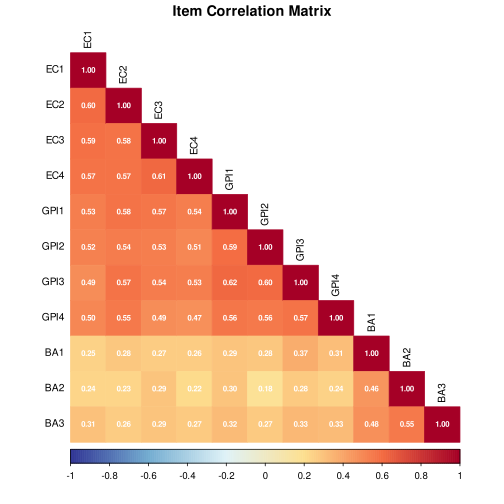
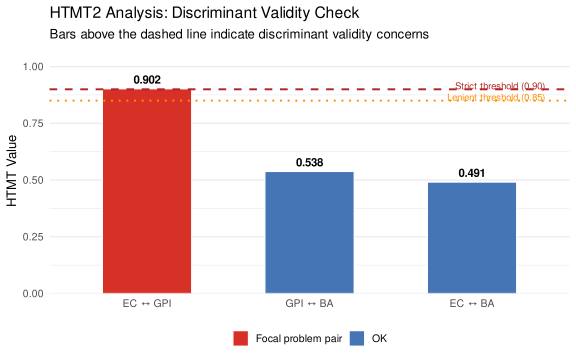
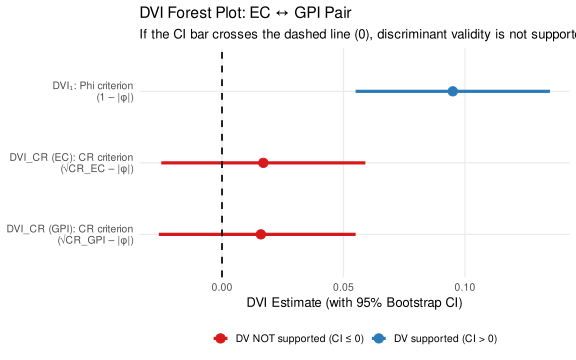
set.seed(2025)
n <- 400

# ── Step 1: Assign participants to conditions ──────────────────────────────────
treatment <- sample(c(0L, 1L), size = n, replace = TRUE)

# ── Step 2: Define the true factor correlation matrix ─────────────────────────
# EC and GPI are correlated at .93 — too high for discriminant validity
# EC–BA and GPI–BA are at more typical, moderate levels
phi_pop <- matrix(
  c(1.00, 0.93, 0.45,   # EC row
    0.93, 1.00, 0.50,   # GPI row
    0.45, 0.50, 1.00),  # BA row
  nrow = 3, byrow = TRUE,
  dimnames = list(c("EC", "GPI", "BA"), c("EC", "GPI", "BA"))
)

# ── Step 3: Generate latent factor scores ─────────────────────────────────────
latent_base <- MASS::mvrnorm(n = n, mu = c(0, 0, 0), Sigma = phi_pop)

EC_lat  <- latent_base[, 1]
GPI_lat <- latent_base[, 2] + 0.40 * treatment  # Green marketing raises GPI by .40 SD
BA_lat  <- latent_base[, 3]

# ── Step 4: Define item loadings ──────────────────────────────────────────────
# These represent how strongly each item reflects its latent construct
lambda_EC  <- c(0.78, 0.82, 0.74, 0.76)
lambda_GPI <- c(0.80, 0.76, 0.82, 0.78)
lambda_BA  <- c(0.72, 0.76, 0.70)

# ── Step 5: Generate continuous item scores (latent score + measurement error) ─
gen_items <- function(latent, loadings) {
  sapply(loadings, function(lam) {
    lam * latent + sqrt(1 - lam^2) * rnorm(length(latent))
  })
}

EC_cont  <- gen_items(EC_lat,  lambda_EC)
GPI_cont <- gen_items(GPI_lat, lambda_GPI)
BA_cont  <- gen_items(BA_lat,  lambda_BA)

# ── Step 6: Round to 7-point Likert scale ─────────────────────────────────────
# Cut the continuous distribution into 7 ordered categories
to_likert7 <- function(x) {
  z <- (x - mean(x)) / sd(x)   # standardise each item
  breaks <- c(-Inf, -1.5, -0.75, -0.25, 0.25, 0.75, 1.5, Inf)
  as.integer(cut(z, breaks = breaks, labels = 1:7))
}

EC_lik  <- apply(EC_cont,  2, to_likert7)
GPI_lik <- apply(GPI_cont, 2, to_likert7)
BA_lik  <- apply(BA_cont,  2, to_likert7)

# ── Step 7: Assemble the final data frame ─────────────────────────────────────
df <- data.frame(
  id        = 1:n,
  condition = factor(treatment, levels = c(0, 1),
                     labels = c("Control", "Green Marketing")),
  EC1  = EC_lik[, 1], EC2  = EC_lik[, 2],
  EC3  = EC_lik[, 3], EC4  = EC_lik[, 4],
  GPI1 = GPI_lik[, 1], GPI2 = GPI_lik[, 2],
  GPI3 = GPI_lik[, 3], GPI4 = GPI_lik[, 4],
  BA1  = BA_lik[, 1], BA2  = BA_lik[, 2], BA3  = BA_lik[, 3]
)

# Quick look at the data
head(df, 5)