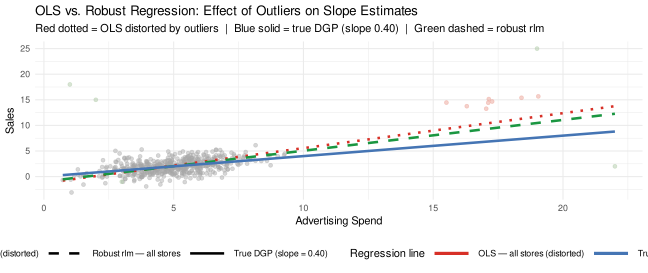
OLS (all stores): Pulled toward the luxury cluster and point outliers, producing a distorted slope well above the true value of 0.40. If you use this coefficient to predict sales for a regular store, you will be systematically wrong.
True DGP (slope = 0.40): The known data-generating process for regular stores — included in the plot because we simulated the data and know the ground truth. In real research you would not see this line.
Robust regression (rlm, all stores): Automatically downweights observations with large residuals (the outliers and luxury stores fit poorly under the regular-store model, so they receive low weights). The resulting coefficient is close to the true value of 0.40 — without having to decide in advance which observations to delete.
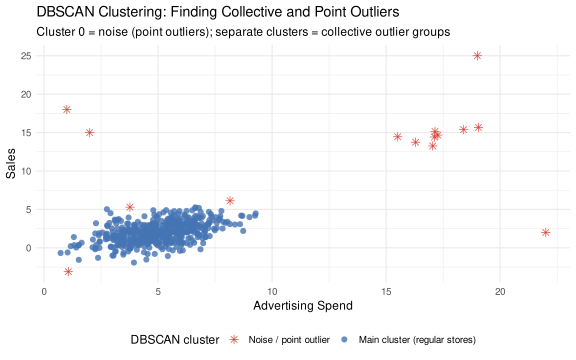
Practical advice: 1. Always plot your data and check for visual outliers before running any regression 2. Use LOF and/or DBSCAN to systematically detect outliers you might miss visually 3. For collective outliers (like luxury stores), investigate whether they represent a distinct subgroup — if so, treat them as a Part 4 problem 4. For point outliers, verify the data and report results with and without them as a robustness check 5. Use robust regression as your primary estimator when you suspect outliers but are not certain which observations to remove