5  Part 3: Measurement Invariance

▶ Load required packages
# Uncomment to install if needed:
# install.packages(c("lavaan", "semTools", "MASS", "ggplot2",
#                    "dplyr", "tidyr", "corrplot", "knitr", "lmtest",
#                    "mclust", "dbscan"))

library(lavaan)       # CFA and SEM (Cases 1 and 3)
library(semTools)     # htmt() and auxiliary SEM tools (Cases 1 and 3)
library(MASS)         # mvrnorm(): generate multivariate normal data (all cases)
library(ggplot2)      # Visualizations (all cases)
library(dplyr)        # Data manipulation (all cases)
library(tidyr)        # Data reshaping (Cases 2 and 3)
library(corrplot)     # Correlation heatmap (Case 1)
library(knitr)        # Nicely formatted tables (all cases)
library(lmtest)       # Breusch-Pagan heteroskedasticity test (Case 2)
library(mclust)       # Gaussian mixture models / latent class analysis (Case 4)
library(dbscan)       # Local outlier factor and DBSCAN clustering (Case 5)

# ── Helper objects shared with Cases 1 and 3 ──────────────────────────────────
# Factor correlation matrix used in simulation
phi_pop <- matrix(
  c(1.00, 0.93, 0.45,
    0.93, 1.00, 0.50,
    0.45, 0.50, 1.00),
  nrow = 3, byrow = TRUE,
  dimnames = list(c("EC", "GPI", "BA"), c("EC", "GPI", "BA"))
)

# Item generation helper
gen_items <- function(latent, loadings) {
  sapply(loadings, function(lam) {
    lam * latent + sqrt(1 - lam^2) * rnorm(length(latent))
  })
}

6 Part 3: Measurement Non-Invariance — A Special Case of Discriminant Validity

6.1 Connecting to Cases 1 and 2

Parts 1 and 2 both showed how Y captures more than X. Part 3 is actually a special case of the discriminant validity problem from Part 1 — it just appears in an experimental context.

Here’s the connection: in Part 1, the GPI scale failed discriminant validity because it was contaminated by a different construct (Environmental Concern). In Part 3, the GPI scale can fail for a more subtle reason — the items behave differently across experimental groups. Two GPI items might score higher in the treatment condition not because participants genuinely intend to purchase more, but because the green marketing exposure makes those specific items feel more socially desirable or salient, independent of any real change in purchase intention.

When that happens, “GPI” no longer measures the same construct across groups. Within each group the scale may be fine; but across groups, the same item is measuring subtly different things. This is a discriminant validity failure in disguise — the measurement model is picking up “item-specific sensitivity to the marketing treatment” alongside “genuine purchase intention.”

And if your sample contains latent subgroups (Part 4), the items may appear non-invariant simply because the two groups are at different levels of the construct — what looks like item shift might actually be group-level differences in the distribution of the latent construct itself.

NoteTwo kinds of shift to distinguish
  • Item shift: A specific item’s baseline level changes across groups, independent of any change in the latent construct. Example: “I always choose the most eco-friendly option available” might score higher after green marketing exposure simply because it sounds more socially appropriate — not because purchase intention truly increased. This is a measurement problem. It’s a bias in the ruler itself.

  • Construct shift: The latent construct itself genuinely has a different mean across groups. This is what we want to detect with our experiment — a real change in Green Purchase Intention. This is a substantive finding.

Item shift always accompanies construct shift when non-invariance is present. That is, if your scale is non-invariant, any real construct shift will be mixed in with the spurious item shift — and you can’t separate them without formal testing.

What produces the group difference in Y How it shows up
Part 1 GPI and EC overlap as constructs High factor correlation; HTMT > 0.90
Part 2 Omitted store quality confounds X and Y Fan-shaped residuals; coefficient instability
Part 3 GPI items shift across conditions Scalar model fails; mod. indices flag specific items

6.2 Two Scenarios to Compare

We will simulate two versions of the data to make the distinction crystal clear:

  • Scenario A — Item shift only: The true GPI construct does NOT change due to the treatment. GPI1 and GPI2 score higher in the treatment group purely because of item-level response shift. Any apparent treatment effect in the data is entirely artifactual.

  • Scenario B — Item shift + construct shift: The true GPI construct DOES change (by 0.40 SD). GPI1 and GPI2 also shift at the item level. The total observed difference in GPI items overestimates the real treatment effect.

Both scenarios show what non-invariance looks like. Scenario A is the extreme case where none of the observed treatment effect is real. Scenario B is more common in practice — there is a real effect, but it gets inflated.

6.3 Simulating the Two Scenarios

▶ Simulate two non-invariance scenarios (A: item shift only; B: item + construct shift)
set.seed(2025)
n3     <- 400
treat3 <- sample(c(0L, 1L), n3, replace = TRUE)

# ── Shared factor structure (same phi_pop as Case 1) ──────────────────────────
latent3  <- MASS::mvrnorm(n3, mu = c(0, 0, 0), Sigma = phi_pop)
EC_lat3  <- latent3[, 1]
BA_lat3  <- latent3[, 3]

lam_GPI3  <- c(0.80, 0.76, 0.82, 0.78)
item_shift <- c(0.80, 0.80, 0.00, 0.00)   # GPI1 and GPI2 shift; GPI3/GPI4 do not

# ── EC and BA: fully invariant across scenarios ────────────────────────────────
EC3_items <- gen_items(EC_lat3, c(0.78, 0.82, 0.74, 0.76))
BA3_items <- gen_items(BA_lat3, c(0.72, 0.76, 0.70))

# ── Scenario A: item shift ONLY — true latent GPI is unchanged by treatment ───
GPI_lat3a <- latent3[, 2]           # NO construct shift
GPI3a <- sapply(seq_along(lam_GPI3), function(i) {
  lam_GPI3[i] * GPI_lat3a +
    sqrt(1 - lam_GPI3[i]^2) * rnorm(n3) +
    item_shift[i] * treat3
})

df3a <- data.frame(
  condition = factor(treat3, labels = c("Control", "Green Marketing")),
  EC1 = EC3_items[,1], EC2 = EC3_items[,2], EC3 = EC3_items[,3], EC4 = EC3_items[,4],
  GPI1 = GPI3a[,1], GPI2 = GPI3a[,2], GPI3 = GPI3a[,3], GPI4 = GPI3a[,4],
  BA1 = BA3_items[,1], BA2 = BA3_items[,2], BA3 = BA3_items[,3]
)

# ── Scenario B: item shift + construct shift — TRUE effect = 0.40 SD ──────────
GPI_lat3b <- latent3[, 2] + 0.40 * treat3   # construct shift
GPI3b <- sapply(seq_along(lam_GPI3), function(i) {
  lam_GPI3[i] * GPI_lat3b +
    sqrt(1 - lam_GPI3[i]^2) * rnorm(n3) +
    item_shift[i] * treat3
})

df3b <- data.frame(
  condition = factor(treat3, labels = c("Control", "Green Marketing")),
  EC1 = EC3_items[,1], EC2 = EC3_items[,2], EC3 = EC3_items[,3], EC4 = EC3_items[,4],
  GPI1 = GPI3b[,1], GPI2 = GPI3b[,2], GPI3 = GPI3b[,3], GPI4 = GPI3b[,4],
  BA1 = BA3_items[,1], BA2 = BA3_items[,2], BA3 = BA3_items[,3]
)
6.4 Visualising Item Shift vs. Construct Shift

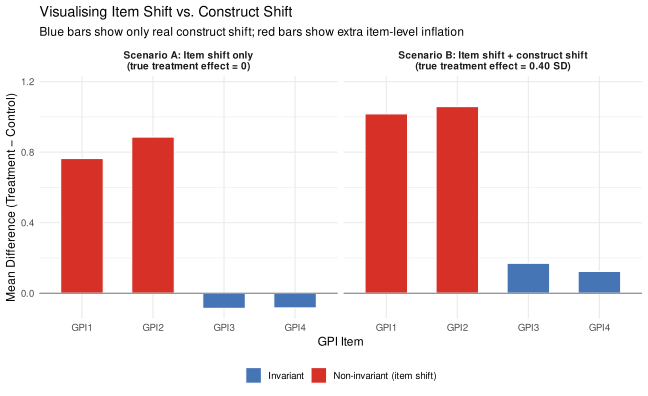
The key visual diagnostic: compare the mean difference (treatment minus control) for each GPI item across both scenarios. If the treatment effect is a pure construct shift, all four items should show roughly the same difference (proportional to their loadings). If some items show disproportionately large differences, that excess is item shift.

▶ Plot: item mean differences across the two scenarios
# Compute item mean differences for both scenarios
get_item_diffs <- function(df, scenario_label) {
  df |>
    group_by(condition) |>
    summarise(across(GPI1:GPI4, mean), .groups = "drop") |>
    pivot_longer(cols = GPI1:GPI4, names_to = "item", values_to = "mean_score") |>
    pivot_wider(names_from = condition, values_from = mean_score) |>
    mutate(
      difference = `Green Marketing` - Control,
      scenario   = scenario_label,
      type       = if_else(item %in% c("GPI1", "GPI2"),
                           "Non-invariant (item shift)",
                           "Invariant")
    )
}

diffs_a <- get_item_diffs(df3a, "Scenario A: Item shift only\n(true treatment effect = 0)")
diffs_b <- get_item_diffs(df3b, "Scenario B: Item shift + construct shift\n(true treatment effect = 0.40 SD)")
all_diffs <- bind_rows(diffs_a, diffs_b)

# Expected construct-only difference: 0.40 * loading for items 3 & 4 (scenario B)
expected_b <- 0.40 * mean(lam_GPI3[3:4])

ggplot(all_diffs, aes(x = item, y = difference, fill = type)) +
  geom_col(width = 0.6, colour = "white") +
  geom_hline(yintercept = 0, colour = "grey50", linewidth = 0.5) +
  facet_wrap(~ scenario) +
  scale_fill_manual(
    values = c("Non-invariant (item shift)" = "#d73027",
               "Invariant"                  = "#4575b4"),
    name = NULL
  ) +
  scale_y_continuous(expand = expansion(mult = c(0.05, 0.15))) +
  labs(
    x        = "GPI Item",
    y        = "Mean Difference (Treatment − Control)",
    title    = "Visualising Item Shift vs. Construct Shift",
    subtitle = "Blue bars show only real construct shift; red bars show extra item-level inflation"
  ) +
  theme_minimal(base_size = 12) +
  theme(legend.position = "bottom",
        strip.text = element_text(face = "bold", size = 10))

WarningWhat to look for across the two panels

Scenario A (left panel): GPI3 and GPI4 show near-zero differences — correct, because the true treatment effect is zero. GPI1 and GPI2 show substantial positive differences — entirely due to item shift. If you averaged all four items and compared group means, you would conclude there is a treatment effect. There isn’t. The apparent effect is entirely measurement artifact.

Scenario B (right panel): GPI3 and GPI4 show moderate differences reflecting the real 0.40 SD construct shift. GPI1 and GPI2 show that same moderate shift plus the extra item shift on top. The total observed difference for GPI1/GPI2 is inflated well above what the latent shift would predict.

In both cases, item-shifted items (red) show disproportionately large treatment–control differences compared to invariant items (blue). This asymmetry is the fingerprint of measurement non-invariance.

6.5 Testing Measurement Invariance Step by Step

The formal test uses a sequence of nested CFA models, each adding one more constraint. We’ll demonstrate using Scenario B (item shift + construct shift), which is the more common real-world situation.

NoteThe three models and what they constrain — connected to item/construct shift
Model What is constrained What it tests Connection to shifts
Configural Nothing (baseline) Same factor structure in both groups? If configural fails, the factor structure itself differs across groups — implying both item shift and construct shift are present (the most severe case)
Metric Factor loadings equal Do items relate to the construct with the same sensitivity across groups? If metric fails (but configural holds), loadings differ — items have different sensitivity to the latent construct across groups — this is item shift (the ruler has different gradations)
Scalar Loadings + item intercepts equal Do items have the same baseline level across groups? If scalar fails (but metric holds), intercepts differ — items have different baseline levels — this is item baseline shift (pure item shift, the cleanest case to diagnose)

Failing configural invariance is the most severe outcome — it means the factor structure itself is not replicable across groups, implying both the constructs and the items are behaving differently. Failing metric invariance (while configural holds) means loadings differ — items have different sensitivity to the latent construct in each group. This is a form of item shift: the ruler itself has different gradations. Failing scalar invariance (while metric holds) means item intercepts differ — items have different baseline levels in each group. This is the classic item-level shift we built into our simulation. You need scalar invariance at minimum to make valid comparisons of latent means across groups.

▶ Fit configural, metric, and scalar invariance models
invar_model <- '
  EC  =~ EC1 + EC2 + EC3 + EC4
  GPI =~ GPI1 + GPI2 + GPI3 + GPI4
  BA  =~ BA1  + BA2  + BA3
'

# Fit the three-model sequence on Scenario B
fit_config <- cfa(invar_model, data = df3b, group = "condition", std.lv = TRUE)
fit_metric <- cfa(invar_model, data = df3b, group = "condition",
                  group.equal = "loadings", std.lv = TRUE)
fit_scalar <- cfa(invar_model, data = df3b, group = "condition",
                  group.equal = c("loadings", "intercepts"), std.lv = TRUE)
▶ Likelihood ratio test sequence
# Likelihood ratio test: significant Δχ² = adding the constraint worsens fit
lrt_result <- lavTestLRT(fit_config, fit_metric, fit_scalar)
print(lrt_result)

Chi-Squared Difference Test

           Df   AIC   BIC   Chisq Chisq diff   RMSEA Df diff Pr(>Chisq)    
fit_config 82 10404 10691  74.105                                          
fit_metric 90 10399 10655  85.376      11.27 0.04521       8     0.1868    
fit_scalar 98 10563 10786 265.072     179.70 0.32758       8     <2e-16 ***
---
Signif. codes:  0 '***' 0.001 '**' 0.01 '*' 0.05 '.' 0.1 ' ' 1
▶ Model fit indices table
extract_fit <- function(fit, label) {
  fi <- fitmeasures(fit, c("chisq", "df", "cfi", "rmsea", "srmr"))
  data.frame(
    Model = label,
    Chisq = round(as.numeric(fi["chisq"]), 1),
    df    = as.integer(fi["df"]),
    CFI   = round(as.numeric(fi["cfi"]),   3),
    RMSEA = round(as.numeric(fi["rmsea"]), 3),
    SRMR  = round(as.numeric(fi["srmr"]),  3)
  )
}

fit_summary <- rbind(
  extract_fit(fit_config, "Configural"),
  extract_fit(fit_metric, "Metric"),
  extract_fit(fit_scalar, "Scalar (full)")
)
rownames(fit_summary) <- NULL

kable(fit_summary,
      col.names = c("Model", "χ²", "df", "CFI", "RMSEA", "SRMR"),
      caption   = "Model Fit Across the Invariance Sequence (Scenario B)")
Model Fit Across the Invariance Sequence (Scenario B)
Model χ² df CFI RMSEA SRMR
Configural 74.1 82 1.000 0.000 0.028
Metric 85.4 90 1.000 0.000 0.042
Scalar (full) 265.1 98 0.925 0.092 0.080
WarningReading the results
  • Configural → Metric: The χ² difference should be non-significant (p > .05). This means item sensitivity (loadings) is the same across groups. The items relate to GPI equally strongly in both conditions. ✓

  • Metric → Scalar: The χ² difference should be significant (p < .05), because we built non-invariant intercepts into GPI1 and GPI2. Full scalar invariance fails. This is the formal evidence of item shift. ✗

When full scalar invariance fails, you cannot validly compare GPI scale means across conditions without first identifying which items are the problem.

6.6 Identifying the Non-Invariant Items

Modification indices tell you which constrained parameters, if freed, would most improve model fit. For a failed scalar model, focus on the intercepts (op == "~1"): the items with the largest modification indices are the non-invariant ones.

▶ Modification indices — find non-invariant items
mi_scalar     <- modindices(fit_scalar, sort. = TRUE)
mi_intercepts <- mi_scalar |>
  filter(op == "~1") |>
  arrange(desc(mi)) |>
  dplyr::select(lhs, op, block, mi, epc)

kable(
  head(mi_intercepts, 10),
  col.names = c("Item", "Type", "Group block", "Mod. Index (MI)", "Expected Change"),
  digits    = 2,
  caption   = "Top Modification Indices for Item Intercepts (Scalar Model, Scenario B)"
)
Top Modification Indices for Item Intercepts (Scalar Model, Scenario B)
Item Type Group block Mod. Index (MI) Expected Change
NoteHow to read the modification indices

Each row is a constrained parameter. The MI column tells you approximately how much the model χ² would drop if you freed that parameter. Large MI values for GPI item intercepts (op == “~1”) point to items with different baseline levels across groups — i.e., items that have shifted.

GPI1 and GPI2 should appear at the top of this list. In real data, these are the items you would examine substantively: why might these specific items behave differently after green marketing exposure, independently of any real change in purchase intention?

ImportantWhen can you drop non-invariant items?

If you pre-registered your measurement invariance analysis before collecting data, you may be able to drop the flagged items (GPI1, GPI2) and use a shortened scale — but only if at least two items remain invariant per factor and you pre-specified this decision rule. Dropping items after finding non-invariance without pre-registration is post-hoc and will raise reviewers’ eyebrows.

If the analysis was not pre-registered, the better approach is partial invariance (see below).

▶ Score-test approach to pinpoint non-invariant items
# lavaan::lavTestScore provides score statistics for each equality constraint.
# Constraints with large X² are the ones most responsible for the scalar model
# failing — these are the non-invariant items.
score_test <- lavaan::lavTestScore(fit_scalar, cumulative = TRUE)

# Extract intercept constraints (op == "~1") and rank by score statistic
score_uni <- as.data.frame(score_test$uni)
score_intercepts <- score_uni[score_uni$op == "~1", ] |>
  dplyr::arrange(dplyr::desc(X2))

kable(
  head(score_intercepts, 8),
  col.names = c("Item", "Type", "RHS", "Score Stat. (X²)", "df", "p-value"),
  digits    = 3,
  caption   = "Score Tests: Intercept Constraints Ranked by Misfit (Scalar Model, Scenario B)"
)
Score Tests: Intercept Constraints Ranked by Misfit (Scalar Model, Scenario B)
Item Type RHS Score Stat. (X²) df p-value
NoteReading the score test results

The score statistic (X²) for each row tells you how much the overall model χ² would improve if that constraint were freed. GPI1 and GPI2 intercepts should appear at the top of this list with the largest X² values and smallest p-values — confirming they are the primary source of scalar non-invariance. This converges with the modification index results above: two complementary approaches, same substantive conclusion.

6.7 Fitting the Partial Invariance Model

Once you identify the non-invariant items, you free their intercepts and re-fit. This is called partial scalar invariance: most intercepts are constrained (equal across groups), but the problematic ones are freed.

▶ Fit partial scalar invariance model
fit_partial <- cfa(invar_model, data = df3b, group = "condition",
                   group.equal   = c("loadings", "intercepts"),
                   group.partial = c("GPI1~1", "GPI2~1"),
                   std.lv = TRUE)

lrt_partial <- lavTestLRT(fit_metric, fit_partial, fit_scalar)
print(lrt_partial)

Chi-Squared Difference Test

            Df   AIC   BIC   Chisq Chisq diff   RMSEA Df diff Pr(>Chisq)    
fit_metric  90 10399 10655  85.376                                          
fit_partial 96 10394 10626  92.350      6.974 0.02849       6     0.3232    
fit_scalar  98 10563 10786 265.072    172.722 0.65330       2     <2e-16 ***
---
Signif. codes:  0 '***' 0.001 '**' 0.01 '*' 0.05 '.' 0.1 ' ' 1
▶ Full fit comparison (configural through full scalar)
fit_summary2 <- rbind(
  extract_fit(fit_config,  "Configural"),
  extract_fit(fit_metric,  "Metric"),
  extract_fit(fit_partial, "Partial scalar (GPI1, GPI2 freed)"),
  extract_fit(fit_scalar,  "Full scalar")
)
rownames(fit_summary2) <- NULL
kable(fit_summary2,
      col.names = c("Model", "χ²", "df", "CFI", "RMSEA", "SRMR"),
      caption   = "Model Fit Including Partial Invariance Model (Scenario B)")
Model Fit Including Partial Invariance Model (Scenario B)
Model χ² df CFI RMSEA SRMR
Configural 74.1 82 1.000 0.000 0.028
Metric 85.4 90 1.000 0.000 0.042
Partial scalar (GPI1, GPI2 freed) 92.3 96 1.000 0.000 0.043
Full scalar 265.1 98 0.925 0.092 0.080
NoteWhat partial invariance means in practice
  • Partial vs. metric: non-significant → freeing GPI1 and GPI2 intercepts is sufficient to restore acceptable fit. The measurement model is now accounting for item shift. ✓
  • Partial vs. full scalar: significant → full invariance genuinely fails; GPI1 and GPI2 were necessary to free.

With partial scalar invariance, you can still compare latent means across groups — but you must be transparent about which items showed item shift and offer a theoretical explanation for why.

6.8 Separating Item Shift from Construct Shift

Here is the payoff. We compare the estimated latent GPI mean difference (treatment − control) under three models:

▶ Compare latent mean estimates across models
get_lv_mean <- function(fit, lv = "GPI") {
  pe     <- parameterEstimates(fit)
  lv_row <- pe[pe$op == "~1" & pe$lhs == lv & pe$group == 2, ]
  if (nrow(lv_row) == 0) return(NA_real_)
  lv_row$est[1]
}

lv_scalar  <- get_lv_mean(fit_scalar)
lv_partial <- get_lv_mean(fit_partial)

latent_comparison <- data.frame(
  Model = c("Full scalar (ignores item shift — biased)",
            "Partial scalar (accounts for item shift — corrected)",
            "True value — known from Scenario B simulation"),
  GPI_latent_mean = round(c(lv_scalar, lv_partial, 0.40), 3)
)

kable(latent_comparison,
      col.names = c("Model", "Estimated GPI Latent Mean Difference (Treatment vs. Control)"),
      caption   = "How Non-Invariance Inflates the Estimated Treatment Effect")
How Non-Invariance Inflates the Estimated Treatment Effect
Model Estimated GPI Latent Mean Difference (Treatment vs. Control)
Full scalar (ignores item shift — biased) 0.865
Partial scalar (accounts for item shift — corrected) 0.191
True value — known from Scenario B simulation 0.400
ImportantThe core lesson: item shift inflates construct shift estimates

The full scalar model forces GPI1 and GPI2 to behave as if they’re invariant. Since they’re not, their elevated scores in the treatment group get attributed to a larger latent GPI shift — inflating the estimated treatment effect above 0.40.

The partial invariance model correctly absorbs the item-level shifts into the freed intercepts, and the estimated latent mean difference recovers to something close to the true 0.40.

This is the discriminant validity connection: the scale in the treatment group is partially measuring “item-specific response to green marketing” alongside “genuine purchase intention” — exactly the same “Y measures X + something else” problem as Part 1. Measurement invariance testing is how you detect it in an experimental setting.

6.9 Other Methods for Testing Measurement Invariance

The configural → metric → scalar sequence using lavaan is the standard approach for continuous (or near-continuous) items. Other options:

  • WLSMV estimator (lavaan): For truly ordinal Likert data (5–7 points), use estimator = "WLSMV" in lavaan with polychoric correlations. The model comparison sequence is the same; the fit statistics and chi-square tests adjust for the ordinal scale.
  • Alignment optimization (Asparouhov & Muthén, 2014): An alternative to the step-wise test sequence for large numbers of groups. Instead of testing constraints, it finds the optimal alignment of factor means and intercepts with minimum non-invariance. Useful when you have many groups (countries, time points) and expect some non-invariance.
  • Bayesian approximate measurement invariance (Muthén & Asparouhov, 2013): Instead of exact equality constraints, allows parameters to be “approximately equal” across groups. Fits naturally in a Bayesian framework and gives more nuanced information about the degree of non-invariance.
  • Item Response Theory (IRT) / Differential Item Functioning (DIF): In educational and clinical measurement, non-invariance is called differential item functioning. Logistic IRT models can flag specific items and parameter levels where DIF occurs. Particularly useful for binary or polytomous items.
  • Random intercept cross-lagged panel model (RI-CLPM): For longitudinal data, this model separates within-person change from stable between-person differences, which is related to the question of whether your scale means the same thing for everyone.