6  Part 4: Latent Subgroups

▶ Load required packages
# Uncomment to install if needed:
# install.packages(c("lavaan", "semTools", "MASS", "ggplot2",
#                    "dplyr", "tidyr", "corrplot", "knitr", "lmtest",
#                    "mclust", "dbscan"))

library(lavaan)       # CFA and SEM (Cases 1 and 3)
library(semTools)     # htmt() and auxiliary SEM tools (Cases 1 and 3)
library(MASS)         # mvrnorm(): generate multivariate normal data (all cases)
library(ggplot2)      # Visualizations (all cases)
library(dplyr)        # Data manipulation (all cases)
library(tidyr)        # Data reshaping (Cases 2 and 3)
library(corrplot)     # Correlation heatmap (Case 1)
library(knitr)        # Nicely formatted tables (all cases)
library(lmtest)       # Breusch-Pagan heteroskedasticity test (Case 2)
library(mclust)       # Gaussian mixture models / latent class analysis (Case 4)
library(dbscan)       # Local outlier factor and DBSCAN clustering (Case 5)

7 Part 4: Latent Subgroups — When Your Sample Contains Two Different Worlds

7.1 Connecting to the Earlier Cases

All three previous parts involved a Y variable contaminated by something extra. Part 4 presents the same problem from a different angle: what if your sample itself is a mixture of two fundamentally different groups of people who respond to your study variables in completely different ways?

Imagine your 600 study participants come from two populations:

  • Green Champions (~60% of the sample): Highly environmentally concerned, willing to pay premium prices for eco-friendly products. They respond strongly to the green marketing campaign.
  • Price Skeptics (~40% of the sample): Price-driven, less concerned with environmental credentials. They barely respond to the same campaign.

If you analyse the full sample as if everyone is the same type of consumer, you get an estimate of the “average” treatment effect. But that average is the mathematical midpoint between two very different responses — it may not accurately describe either group. Your GPI outcome now measures a mixture of “how Green Champions responded” and “how Price Skeptics responded.” That is, once again, Y reflects more than X.

This pooling-driven inflation of correlations is the same mechanism that produces apparent discriminant validity violations (Part 1): when you have two groups sitting in different positions on both EC and GPI, the pooled correlation between them will be much higher than within-group correlations — and may push you past the HTMT threshold.

NoteThe connection to discriminant validity

When you pool two latent classes in a single analysis, the between-class variance inflates the apparent correlations among your variables. Green Champions are high on EC and high on GPI; Price Skeptics are low on both. Even if within each class EC and GPI were distinguishable, the pooled correlation may be much higher — and could push you into discriminant validity failure territory.

The latent class problem and the discriminant validity problem are therefore linked: latent subgroups can cause apparent discriminant validity violations in pooled data that would disappear if you analyzed each class separately.

7.2 Simulating the Two-Class Dataset

We need more variables than in earlier cases for the class-detection algorithm to work reliably. We include:

  • EC — 3-item Environmental Concern scale
  • WTP — 3-item Willingness to Pay Premium scale
  • PS — 3-item Price Sensitivity scale (reversed relative to WTP)
  • GPI — 4-item Green Purchase Intention (DV)
▶ Simulate two-class consumer dataset (n=600)
set.seed(2025)
n4   <- 600

# ── Assign latent class membership ────────────────────────────────────────────
# 60% Green Champions, 40% Price Skeptics
true_class <- sample(c("Green Champion", "Price Skeptic"),
                     size = n4, replace = TRUE,
                     prob = c(0.60, 0.40))

# ── Define class-specific latent factor means ─────────────────────────────────
# Green Champions: high EC, high WTP, low PS
# Price Skeptics: low EC, low WTP, high PS
# Centred within class (class differences are large)

class_means <- list(
  "Green Champion" = c(EC = 1.2,  WTP =  1.0, PS = -1.0, GPI =  1.0),
  "Price Skeptic"  = c(EC = -0.8, WTP = -0.7, PS =  0.8, GPI = -0.7)
)

# ── Generate latent scores: common factor structure, different means ───────────
lam_ec  <- c(0.78, 0.75, 0.80)
lam_wtp <- c(0.76, 0.80, 0.74)
lam_ps  <- c(0.72, 0.75, 0.70)
lam_gpi <- c(0.80, 0.76, 0.82, 0.78)

gen_class_items <- function(n, lam, class_mean, class_labels) {
  # latent scores with class-specific mean
  latent <- ifelse(class_labels == "Green Champion",
                   rnorm(n, mean = class_mean["Green Champion"], sd = 0.8),
                   rnorm(n, mean = class_mean["Price Skeptic"],  sd = 0.8))
  sapply(lam, function(l) l * latent + sqrt(1 - l^2) * rnorm(n))
}

EC_4  <- gen_class_items(n4, lam_ec,  c("Green Champion" = 1.2,  "Price Skeptic" = -0.8), true_class)
WTP_4 <- gen_class_items(n4, lam_wtp, c("Green Champion" = 1.0,  "Price Skeptic" = -0.7), true_class)
PS_4  <- gen_class_items(n4, lam_ps,  c("Green Champion" = -1.0, "Price Skeptic" =  0.8), true_class)
GPI_4 <- gen_class_items(n4, lam_gpi, c("Green Champion" = 1.0,  "Price Skeptic" = -0.7), true_class)

# ── Compute scale scores for LCA input ────────────────────────────────────────
df4 <- data.frame(
  true_class = true_class,
  EC_score   = rowMeans(EC_4),
  WTP_score  = rowMeans(WTP_4),
  PS_score   = rowMeans(PS_4),
  GPI_score  = rowMeans(GPI_4)
)
7.3 Step 1: Seeing the Pooled vs. Within-Class Pattern

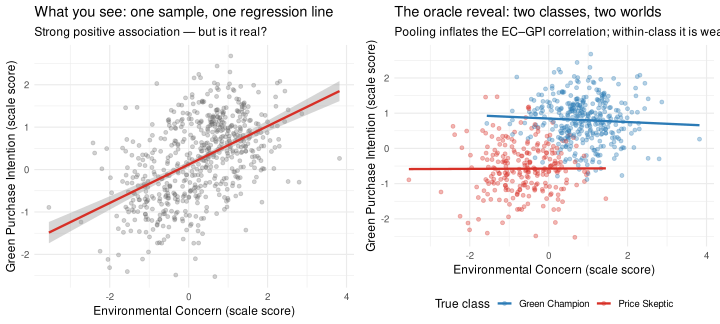
Before running any algorithm, let’s look at what happens when you ignore class membership. We’ll plot EC versus GPI, coloured first without class information (as a real researcher would see it), then revealing the true classes.

▶ Plot: pooled scatterplot vs. oracle class-colored version
p_blind <- ggplot(df4, aes(x = EC_score, y = GPI_score)) +
  geom_point(alpha = 0.3, colour = "grey40", size = 1.5) +
  geom_smooth(method = "lm", se = TRUE, colour = "#d73027", linewidth = 1.1) +
  labs(
    x        = "Environmental Concern (scale score)",
    y        = "Green Purchase Intention (scale score)",
    title    = "What you see: one sample, one regression line",
    subtitle = "Strong positive association — but is it real?"
  ) +
  theme_minimal(base_size = 12)

p_reveal <- ggplot(df4, aes(x = EC_score, y = GPI_score, colour = true_class)) +
  geom_point(alpha = 0.35, size = 1.5) +
  geom_smooth(aes(group = true_class), method = "lm", se = FALSE, linewidth = 1.1) +
  scale_colour_manual(
    values = c("Green Champion" = "#2c7bb6", "Price Skeptic" = "#d73027"),
    name   = "True class"
  ) +
  labs(
    x        = "Environmental Concern (scale score)",
    y        = "Green Purchase Intention (scale score)",
    title    = "The oracle reveal: two classes, two worlds",
    subtitle = "Pooling inflates the EC–GPI correlation; within-class it is weaker"
  ) +
  theme_minimal(base_size = 12) +
  theme(legend.position = "bottom")

# Display side-by-side
gridExtra_available <- requireNamespace("gridExtra", quietly = TRUE)
if (gridExtra_available) {
  gridExtra::grid.arrange(p_blind, p_reveal, ncol = 2)
} else {
  print(p_blind)
  print(p_reveal)
}

WarningSimpson’s Paradox — when aggregation reverses the pattern

What you just saw in the two panels is a textbook example of Simpson’s Paradox: a relationship that appears strong and consistent in the aggregate data reverses — or dissolves — when you condition on a hidden grouping variable.

Simpson’s Paradox comes up whenever your data have a nested structure that you’re ignoring. The classic marketing contexts: - Survey data pooled across different market segments - Panel data where unit-level effects differ from the aggregate trend - Multi-country datasets where the country effect dominates individual-level effects - Any dataset where “the sample” is actually a mixture of distinct populations

The high pooled EC–GPI correlation in the left panel does not mean EC and GPI are measuring the same thing within each group. It means the two groups sit in different positions on both variables — and when you pool them, that between-group variance inflates the correlation. This is exactly the mechanism that causes discriminant validity failures when latent subgroups are present (Part 1 connection).

WarningWhat the two panels show

Left panel (what you see): A single strong positive relationship between EC and GPI — suggesting the two constructs are highly correlated. This is exactly the discriminant validity warning sign from Part 1.

Right panel (oracle reveal): The relationship separates into two distinct clusters. Within each class, the EC–GPI correlation is much weaker. The high pooled correlation is largely a consequence of the two groups sitting at different positions on both axes — not because EC and GPI measure the same thing within a group.

This is called Simpson’s paradox in statistics — aggregate patterns can completely reverse or disappear when you break the data down by a hidden grouping variable.

7.4 Step 2: The EM Algorithm — Finding the Hidden Groups

The Expectation-Maximisation (EM) algorithm is the engine behind Gaussian mixture models (the continuous-variable equivalent of latent class analysis). The idea is beautifully simple:

  1. Start with a guess: Randomly assign each person to a class
  2. E step (Expectation): Given the current class estimates, compute the probability that each person belongs to each class
  3. M step (Maximization): Given those probabilities, update the class means and variances to best fit the data
  4. Repeat until the assignments stop changing
NoteWhat the EM algorithm is actually doing — a concrete example

Imagine you are looking at a scatterplot of EC and GPI scores and you can see two rough blobs of points but you can’t tell where one ends and the other begins.

Starting guess (Step 0): The algorithm randomly places two “cluster centers” somewhere in the data. Think of these as two starting hypotheses about where Green Champions and Price Skeptics tend to sit.

E-step (Expectation): For each person in the data, the algorithm computes: “Given where the cluster centers currently are, what is the probability this person belongs to Class 1 vs. Class 2?” Someone right at the edge between the two clusters gets, say, 55% Class 1 and 45% Class 2. Someone deep inside a cluster gets 99% vs. 1%. These are soft assignments — everyone has a probability of belonging to each class, not a hard yes/no.

M-step (Maximization): Using those probabilities as weights, the algorithm recalculates the best-fitting cluster center for each class. A person who is 99% Class 1 contributes almost fully to the Class 1 center. A person who is 50/50 contributes half to each. The cluster centers shift to better fit the data.

Repeat: The algorithm alternates E and M steps until the cluster centers stop moving (converge). At that point, you have your estimated latent classes.

The key advantage over k-means (which you may have heard of): EM produces probabilities, not hard assignments. This is both more realistic (most people are not purely one type) and more statistically principled. It also naturally handles clusters of different shapes and sizes.

▶ Fit Gaussian Mixture Model (EM algorithm, G=2)
# Scale the input variables for the GMM
# Use EC, WTP, PS, and GPI scores as indicator variables
scale_scores <- df4 |>
  select(EC_score, WTP_score, PS_score, GPI_score) |>
  scale()

# ── Fit Gaussian Mixture Model with 2 classes ─────────────────────────────────
# mclust tries different covariance structures automatically;
# G=2 specifies we want exactly 2 components (latent classes)
set.seed(2025)
gmm_fit <- mclust::Mclust(scale_scores, G = 2, verbose = FALSE)

# ── Extract classification results ────────────────────────────────────────────
df4$estimated_class <- factor(gmm_fit$classification,
                               levels = 1:2,
                               labels = c("Class 1", "Class 2"))

# ── Classification accuracy: how well did EM recover the true classes? ─────────
class_table <- table(True = df4$true_class,
                     Estimated = df4$estimated_class)
kable(class_table,
      caption = "True vs. Estimated Class Assignment (EM Algorithm)")
True vs. Estimated Class Assignment (EM Algorithm)
Class 1 Class 2
Green Champion 1 351
Price Skeptic 239 9
NoteReading the classification table

Each row is a true class; each column is the EM-estimated class. The diagonal shows correct assignments. If the EM algorithm worked well, most Green Champions should land in one column and most Price Skeptics in the other. With four well-separated variables, you should see classification accuracy above 90%.

In real data, you won’t have the “True” row — you’ll only see the estimated classes. The table here is a diagnostic we can run because we simulated the data.

7.5 Step 3: Comparing Class Profiles

▶ Plot: consumer segment profiles
# Compute mean scale scores by estimated class
class_profiles <- df4 |>
  group_by(estimated_class) |>
  summarise(
    EC  = mean(EC_score),
    WTP = mean(WTP_score),
    PS  = mean(PS_score),
    GPI = mean(GPI_score),
    .groups = "drop"
  ) |>
  pivot_longer(cols = EC:GPI, names_to = "variable", values_to = "mean_score")

ggplot(class_profiles, aes(x = variable, y = mean_score,
                            fill = estimated_class, group = estimated_class)) +
  geom_col(position = position_dodge(0.7), width = 0.6, colour = "white") +
  geom_hline(yintercept = 0, colour = "grey40") +
  scale_fill_manual(
    values = c("Class 1" = "#2c7bb6", "Class 2" = "#d73027"),
    name   = "Estimated class"
  ) +
  scale_x_discrete(labels = c("EC" = "Environmental\nConcern",
                               "WTP" = "Willingness\nto Pay",
                               "PS"  = "Price\nSensitivity",
                               "GPI" = "Green Purchase\nIntention")) +
  labs(
    x        = NULL,
    y        = "Mean Standardised Score",
    title    = "Class Profiles: The Two Consumer Segments",
    subtitle = "Classes differ systematically across all four variables"
  ) +
  theme_minimal(base_size = 12) +
  theme(legend.position = "bottom")

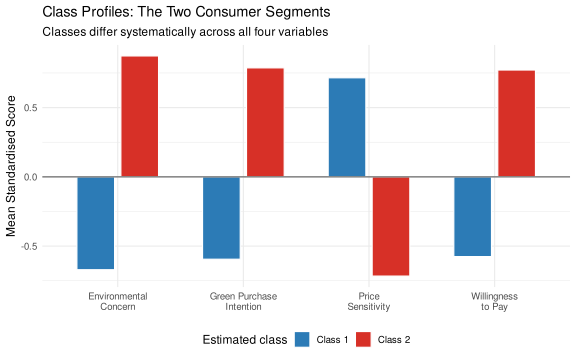
NoteInterpreting the class profiles — reading the bar chart

Work through the chart one variable at a time:

Environmental Concern (EC): One class scores substantially above zero (positive standardized mean) and the other scores below zero. This tells you the two classes genuinely differ in how environmentally concerned they are — not a small difference, but a meaningful separation. Whichever class is high on EC is your candidate for “Green Champions.”

Willingness to Pay (WTP): Does the high-EC class also score high on WTP? If yes, this is a coherent consumer segment: they care about the environment and are willing to pay for it. If you saw high EC but low WTP, that would suggest “virtue signaling” rather than true green consumption — a very different strategic implication.

Price Sensitivity (PS): Expect this to flip relative to EC and WTP. The environmentally-minded, WTP-high class should score low on price sensitivity. The other class should score high on price sensitivity — they prioritize cost over environmental credentials. When variables flip in opposite directions across classes, that confirms the classes are meaningfully distinct, not just statistical noise.

Green Purchase Intention (GPI): This is your DV. If the EC/WTP-high class also scores high on GPI, your treatment (green marketing) is likely to resonate with them. The other class’s low GPI score tells you the campaign may have little traction there.

The practical takeaway: These profiles are the “face” of your latent classes. Before running class-specific analyses, you need to be able to give each class a substantive name and interpretation. If the profiles don’t make sense theoretically, reconsider whether the number of classes you specified (G=2) is right — or whether the variables you used for the GMM are the right ones.

7.6 Step 4: What to Do Next — Class-Specific Analyses

▶ Treatment effects by latent class
# Treatment effect of the green marketing campaign, estimated separately per class
# Recall: Green Champions have high GPI regardless; Skeptics barely move

# For illustration, simulate a treatment variable
set.seed(2025)
df4$treatment <- sample(c(0L, 1L), n4, replace = TRUE)

# Naive pooled model
m_pooled <- lm(GPI_score ~ treatment, data = df4)

# Class-specific models
m_class1 <- lm(GPI_score ~ treatment,
               data = filter(df4, estimated_class == "Class 1"))
m_class2 <- lm(GPI_score ~ treatment,
               data = filter(df4, estimated_class == "Class 2"))

class_effects <- data.frame(
  Model = c("Pooled (ignores classes)",
            "Class 1 (Green Champions)",
            "Class 2 (Price Skeptics)"),
  `Treatment effect on GPI` = round(c(coef(m_pooled)["treatment"],
                                      coef(m_class1)["treatment"],
                                      coef(m_class2)["treatment"]), 3),
  `N` = c(n4,
          sum(df4$estimated_class == "Class 1"),
          sum(df4$estimated_class == "Class 2"))
)

kable(class_effects,
      col.names = c("Model", "Treatment Effect on GPI", "N"),
      caption   = "Treatment Effect Estimates: Pooled vs. Class-Specific")
Treatment Effect Estimates: Pooled vs. Class-Specific
Model Treatment Effect on GPI N
Pooled (ignores classes) -0.040 600
Class 1 (Green Champions) 0.017 240
Class 2 (Price Skeptics) -0.035 360
ImportantWhat the class-specific estimates reveal

The pooled estimate is a weighted average of two very different effects. If Green Champions respond strongly to the campaign and Price Skeptics barely respond, the pooled estimate sits somewhere in the middle — understating the effect for Champions and overstating it for Skeptics. Neither number is particularly useful for a manager deciding how to allocate a marketing budget.

Key takeaway for researchers: If your sample contains meaningful subgroups with different response patterns, any single estimate of “the effect” is an artificial average. Always explore whether your findings are robust across identifiable segments. Latent class / Gaussian mixture models are one tool for discovering those segments when you don’t know them in advance.

7.7 What to Look For in Your Own Data

NoteChecklist: signs that latent subgroups may be distorting your results
  1. Unexpectedly high HTMT / factor correlations in pooled data that seem theoretically implausible — check whether subgroups could be inflating the pooled correlation (Part 1 connection)
  2. Bimodal or non-normal distributions in your scale scores — histogram with two humps suggests a mixture
  3. Unstable regression coefficients across subsamples (men vs. women, different markets, etc.)
  4. Large heterogeneity in individual responses — residual variance is very high despite significant effects
  5. Substantive theory predicting different consumer types — always the best starting point

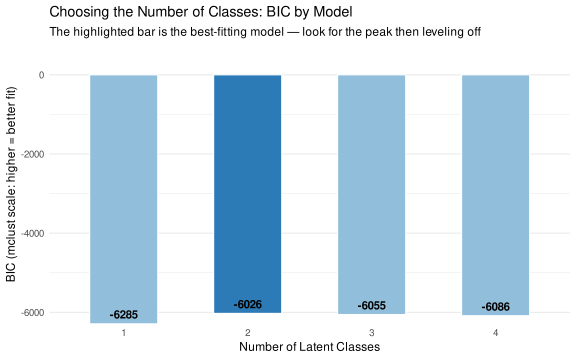
When you suspect latent classes, fit GMMs with G=1, G=2, G=3, G=4 and compare BIC. In mclust, higher BIC is better — look for the number of classes where BIC peaks.

▶ Plot: BIC model selection (G=1 to G=4)
# Fit models for 1–4 classes and compare BIC
# mclust BIC: HIGHER is better (mclust uses a convention opposite to standard BIC)
# mclust maximizes BIC rather than minimizing it — the HIGHEST BIC = best fit
gmm_fits <- lapply(1:4, function(g) mclust::Mclust(scale_scores, G = g, verbose = FALSE))
bic_vals <- sapply(gmm_fits, function(m) max(m$BIC))   # mclust returns BIC matrix

bic_df <- data.frame(
  Classes = 1:4,
  BIC     = round(bic_vals, 1)
)

ggplot(bic_df, aes(x = factor(Classes), y = BIC, fill = factor(Classes == which.max(BIC)))) +
  geom_col(width = 0.55, colour = "white") +
  geom_text(aes(label = round(BIC, 0)), vjust = -0.5, fontface = "bold", size = 4) +
  scale_fill_manual(values = c("FALSE" = "#91bfdb", "TRUE" = "#2c7bb6"),
                    guide = "none") +
  scale_y_continuous(expand = expansion(mult = c(0, 0.12))) +
  labs(
    x        = "Number of Latent Classes",
    y        = "BIC (mclust scale: higher = better fit)",
    title    = "Choosing the Number of Classes: BIC by Model",
    subtitle = "The highlighted bar is the best-fitting model — look for the peak then leveling off"
  ) +
  theme_minimal(base_size = 12) +
  theme(panel.grid.major.x = element_blank())

NoteHow to read the BIC chart

In mclust, higher BIC is better (mclust uses a flipped convention from textbook BIC). Look for the number of classes where BIC peaks — that is the model the data support. A clear peak at G=2 with lower values at G=1 and G=3 confirms a two-class solution. If BIC keeps rising to G=3 or G=4, you may need more classes — but always check that additional classes are substantively interpretable, not just statistical noise.

7.8 Simpson’s Paradox: When Aggregation Reverses the Story

The latent subgroup problem is a close cousin of a classical statistical phenomenon called Simpson’s Paradox: a relationship that exists or appears significant in pooled data can reverse direction — or disappear entirely — when you look within groups.

7.8.1 In Secondary (Observational) Data

In the Case 4 data you have already computed, you can see this directly. The pooled correlation between EC and GPI is very high — but not because EC drives GPI within each class. It is high because Green Champions score high on both, and Price Skeptics score lower on both. Pooling creates a spurious between-group correlation that looks like a meaningful within-group relationship.

This is Simpson’s Paradox in observational data: the aggregate pattern (high EC → high GPI) is real in the pooled sample, but it is a group-composition artifact, not an individual-level causal relationship. Within Green Champions, EC and GPI may be only weakly related. Within Price Skeptics, the same. The strong pooled correlation is driven entirely by the groups sitting at different locations on both variables.

7.8.2 In Experimental Designs: A Subtler Version

Simpson’s Paradox appears in a subtler but more dangerous form in experiments. Consider a study with two conditions — Low and High — that manipulates a focal construct (the manipulation check, MC). The between-group t-test is significant: the treatment effect appears. But what if, within each condition, MC scores have no relationship to the outcome DV at all?

This is not a hypothetical. It happens when:

  1. The manipulation successfully shifts mean MC across conditions (groups differ in mean MC).
  2. But MC variability within each condition is unrelated to DV — individual differences in MC don’t predict individual differences in DV.
  3. A pooled regression of DV on MC shows a positive slope — because it is picking up the group-level offset, not a within-person construct-outcome relationship.

This structure is critical: the treatment effect is real (DV is higher in the High condition), but the construct of interest (MC as a latent variable) has zero within-group relationship to the DV. If you report a mediation through MC, that mediation coefficient is spurious — it is capturing the group-level offset, not a construct-level relationship.

The code below simulates exactly this situation. The beta_within slider lets you control whether there is any within-group relationship between MC and DV. At zero, all apparent relationship is purely between-group — a Simpson’s Paradox induced by experimental assignment.

Figure 7.1: Scatter plot of manipulation check vs. DV. Solid lines = within-condition regression. Dashed black = pooled regression. At β = 0, the pooled slope is entirely a between-group artifact — Simpson’s Paradox.
ImportantWhy this matters: Simpson’s Paradox as a marker of omitted variable bias

When β_within = 0, the pooled slope between MC and DV is entirely a between-group artifact — it reflects the offset between conditions, not any within-person construct-to-outcome relationship. This is a strong diagnostic signal: if the manipulation check scores predict the outcome only in the pooled sample but not within conditions, that is direct evidence of omitted variable bias.

The group-level difference in DV is real (the manipulation worked), but the construct measured by MC has zero individual-level relationship to DV within either condition. Any analysis that uses the pooled MC–DV association — including a mediation test — will falsely attribute the group-level effect to the construct, rather than to the experimental assignment itself.

In plain terms: you can have a perfectly successful experiment (DV is higher in the High condition) while the construct you think caused it (MC) has no within-condition predictive power at all. The Simpson’s Paradox structure tells you that something you did not measure — the experimental assignment — is the actual driver of the DV difference, not the within-person level of the construct. Before reporting any construct-level interpretation or mediation pathway, always verify that the MC–DV relationship holds within conditions, not just in the pooled sample.

7.9 Other Methods for Detecting Latent Subgroups

Gaussian mixture models (mclust) are the continuous-variable analogue of latent class analysis. Related methods:

  • Latent Class Analysis (LCA) proper: For categorical indicators (e.g., nominal responses, binary items), LCA fits discrete latent classes using the poLCA package in R. The logic is identical to the GMM shown here, but designed for non-continuous data.
  • Latent Profile Analysis (LPA): When indicators are continuous (as in our scale scores), LCA applied to continuous data is technically LPA. The tidyLPA package provides a user-friendly interface and compares multiple model specifications.
  • K-means clustering: Simpler and faster than GMM but makes stronger assumptions (spherical clusters of equal size). A good first pass but less principled for inference. Use it to explore; use GMM to confirm.
  • Hierarchical clustering: Builds a dendrogram of observations. No need to specify the number of clusters in advance — the dendrogram lets you visually choose where to cut. Good for small-to-medium datasets; computationally expensive for large ones.
  • Moderated regression / interaction effects: If you have a theoretically motivated segmentation variable (age, gender, market), a simpler approach than LCA is to test whether your key effects differ by segment using interaction terms.
  • Finite mixture models for regression (flexmix package in R): Extends the GMM idea to regression contexts — fits separate regression lines for each latent class simultaneously. This is the most direct analog to “class-specific treatment effects” if you want a fully model-based approach.